Choose an accounting transaction type
Find the right Rentari workflow for income, spending, account movements, deposits and adjustments.
On this page
Have the bank statement, receipt, settlement statement or prior accounting record that identifies the actual event. A deposit can contain several parts, and a withdrawal is not always an expense.
Sign in to the intended landlord portfolio with accounting access. Follow any access or plan message; some choices require an accounting plan. Use existing records before adding a second copy of an imported or automatically recorded event.
Start with what happened, then choose the workflow that records it. Rentari groups manual choices by purpose rather than using separate cash-in and cash-out columns.
Step 1: Open the transaction choices
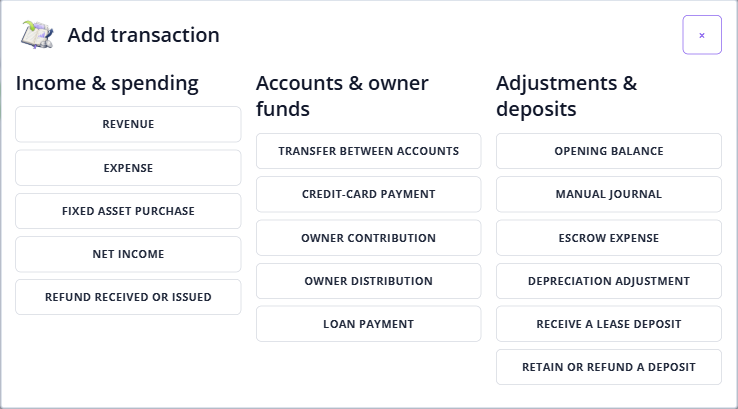
Choose Open Import feed below, then Add transaction. The chooser has Income & spending, Accounts & owner funds and Adjustments & deposits. In Expenses, Add expense opens the expense form; use Other transaction types and Open Add transaction for the wider chooser.
Step 2: Choose the actual event
Use the groups below to find the matching purpose. For an imported bank row, use its booking or comparison actions and preserve the source account. Do not add a manual duplicate simply because a row is unbooked, filtered out or waiting for review.
Income & spending
| Choice | When to use it and what opens |
|---|---|
| Revenue | Income such as rent or an earned fee. Choose its income Account, Deposited to account, date and scope. Check whether Rentari has already recorded the payment or matched the payout before adding it again. |
| Expense | An ordinary cost of operating the rental business. Choose the expense Account and Paid from account. Keep repairs, improvements, loan principal and owner movements distinct; a type label does not establish tax deductibility. |
| Fixed asset purchase | A purchase being recorded against an asset. The form needs Paid from, Asset account and an unlinked active Fixed asset. Its property and purchase amount must match the asset’s recorded cost basis. Review prior purchase and depreciation history first. |
| Net income | A deposit with gross revenue and withheld expenses. Opens Book a net settlement: enter the Net deposit received and the gross-revenue and withheld-expense lines, then Review posting. The parts must reconcile to the deposit. This is a transaction workflow, not a report total. |
| Refund received or issued | A refund already paid or received against an eligible original transaction. Opens Record a refund. Find and select the Original transaction; the adjustment retains its category, property and vendor and is capped by its remaining refundable amount. It does not send a refund or resolve a failed rent payment. |
Accounts & owner funds
| Choice | When to use it and what opens |
|---|---|
| Transfer between accounts | Money already moved between two distinct ordinary accounts. Supply Transferred from and Transferred to. This records the movement without creating another income or expense; review both imported sides and any existing match before booking another copy. |
| Credit-card payment | Repayment of a card balance. Select the asset account under Transferred from and the liability card under Credit-card account. The repayment is different from the original card purchases; recording it as another expense can duplicate spending. |
| Owner contribution | Funds an owner supplied to the business. The form asks for Deposited to and an Equity account. Keep this separate from ordinary rental Revenue, and use the entity and supporting records to determine the appropriate accounting treatment. |
| Owner distribution | Funds taken from the business by an owner. The form asks for Paid from and an Equity account. Keep this separate from ordinary Expense. The name alone does not establish the tax consequences of the movement. |
| Loan payment | Opens Loans in Manage accounts. Open the relevant loan and use its payment workflow with the actual principal, interest and escrow amounts from the lender statement. Do not classify the entire payment as interest or assume a suggested breakdown is final. |
Adjustments & deposits
| Choice | When to use it and what opens |
|---|---|
| Opening balance | Opens Opening balances & journals with Opening balance selected. Use reviewed asset, liability and equity balances from the prior books or statement. Do not add ordinary income or spending merely to force a starting balance. |
| Manual journal | Opens Opening balances & journals with Manual journal selected. Prepare balanced debit and credit lines against existing accounts. Submit for review and approval are separate actions. Read Journal report coverage before expecting a report to include the adjustment. |
| Escrow expense | Opens the journal workflow for Expense paid from mortgage escrow. Use the actual expense paid by the mortgage servicer and its escrow asset account. Funding escrow through a monthly loan payment is a different event; avoid recording both as the same expense. |
| Depreciation adjustment | Opens the journal adjustment for depreciation expense and accumulated depreciation. This journal does not update the fixed-asset schedule. Check existing asset postings and the appropriate depreciation amount before creating another adjustment. |
| Receive a lease deposit | Opens Lease profiles so you can choose the correct lease and its deposit workflow. Refundable tenant deposits differ from rent income. Use the lease’s recorded deposit activity rather than a generic income entry or manual trust journal. |
| Retain or refund a deposit | Opens Which lease is the deposit for? Choose the correct lease, then review the retained amount, deductions and refund through that dedicated workflow. Receiving, retaining and refunding a deposit are separate events; an accounting adjustment does not itself return tenant funds. |
Step 3: Check the accounts, scope and next action
Read the selected form’s labels before continuing. An Account can mean an income or expense category, while Paid from, Deposited to and transfer fields identify the money accounts. A missing required account, incompatible book or property, protected tenant funds, or an unavailable original entry needs review; choosing a convenient substitute can misclassify the event.
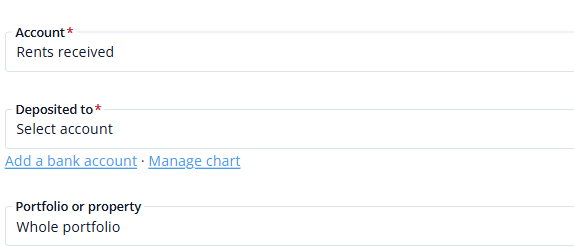
Ordinary manual forms offer Portfolio or property, including Whole portfolio. Select the property when the entry belongs to that rental. Whole portfolio is an unassigned portfolio-level entry; it does not automatically split a cost among properties. Use the portfolio-expense guide for report treatment.
Available scope differs by workflow. Journals have Book, Property and Unit controls; use a unit only when the chosen workflow offers it and the entry belongs there. A sub-portfolio groups properties for organization and report filtering; it is different from a transaction type, chart account or bank account. Do not assume every manual form has a sub-portfolio or unit selector.
Use the detailed guide for the workflow you opened. Ordinary forms use Add; settlements and refunds offer Review posting before their booking action. Journals use Submit for review, then a separate Approve & post journal. Read the displayed result and inspect the saved record before retrying an uncertain save. In an ordinary form, Retry same entry reuses the pending request; do not create another entry to test whether the first saved.
Journal approval does not make every report include journal adjustments. Read the current coverage message and the report’s source, period and scope. Journals do not move funds or update loan or fixed-asset schedules. Use dedicated lease workflows for tenant deposits, prepaid rent and trust balances.
Vendors and transaction matching rules
When vendor tracking is enabled and the form offers Vendor, attach the appropriate saved vendor. A vendor records who the activity concerns; it does not replace the type, category, money account or property. Keep sensitive tax information in the dedicated vendor workflow rather than transaction descriptions. See vendor accounting records.
Rules apply saved matching conditions to new imports and may book matching activity. They do not establish that an event is genuine, choose its legal tax treatment or correct an earlier duplicate. Check the result against the statement and existing records. See transaction matching rules.
For tax treatment of rental income, refundable deposits, repairs, improvements and depreciation, consult IRS Publication 527 and the professional responsible for your records. Rentari’s choice labels are not a determination that an expense is deductible or an owner movement is tax-free.
Check the result
- The selected choice opens the intended form or dedicated workspace, with the event’s accounts and scope identified before posting.
- You can distinguish recording an event from actually collecting, transferring or returning money.
FAQs
Is every bank withdrawal an expense?
No. Loan principal, account transfers, card repayments, owner distributions and tenant-deposit returns have different purposes. Review the source record, actual accounts and dedicated workflow. Do not infer the type from the amount’s sign alone.
Does choosing a type send money or complete a refund?
Ordinary accounting entries record events that happened elsewhere. Transfer and card-payment choices do not send funds, and Record a refund does not refund a card, rent charge or security deposit. Deposit returns and payment actions use their dedicated workflows and confirmations.