From lease draft to signed agreement.

Choose the rental, add your tenant and set the rent and dates. Review the agreement before inviting the renter and owner to sign; keep the completed copy with the lease.

Property documents

1240 Vine Street · Unit 4B

Saved
Vine Street lease.pdf

Signed by Alex Morgan and Jordan Reyes

Signed
Completion certificate.pdf

Signing record · Jul 24, 2026

PDF

Residential lease

Rental
1240 Vine Street · Unit 4B
Monthly rent
$1,850
Lease term
Aug 1, 2026 to Jul 31, 2027
Rent due
1st of each month
Tenant: Alex MorganOwner: Jordan Reyes

Signed PDF and completion certificate, together.

Saved copy. Keep the signed PDF and certificate.

Creating a document and sending invitations are separate actions. Sending follows the product’s plan and confirmation requirements.

Three steps, with your review in the middle.

  1. 01 / Draft

    Start with your rental details

    Choose the property, lease term, rent and deposit. Use a state-specific template or bring your own lease document.

  2. 02 / Review

    Check the terms before sending

    Read the draft, review flagged clauses and edit the terms. Check disclosures and any riders that apply to your rental.

  3. 03 / Sign

    Send and track signatures

    Invite the parties through secure signing links. Follow signature status and keep the completed agreement with the rental's documents.

The details, when you need them.

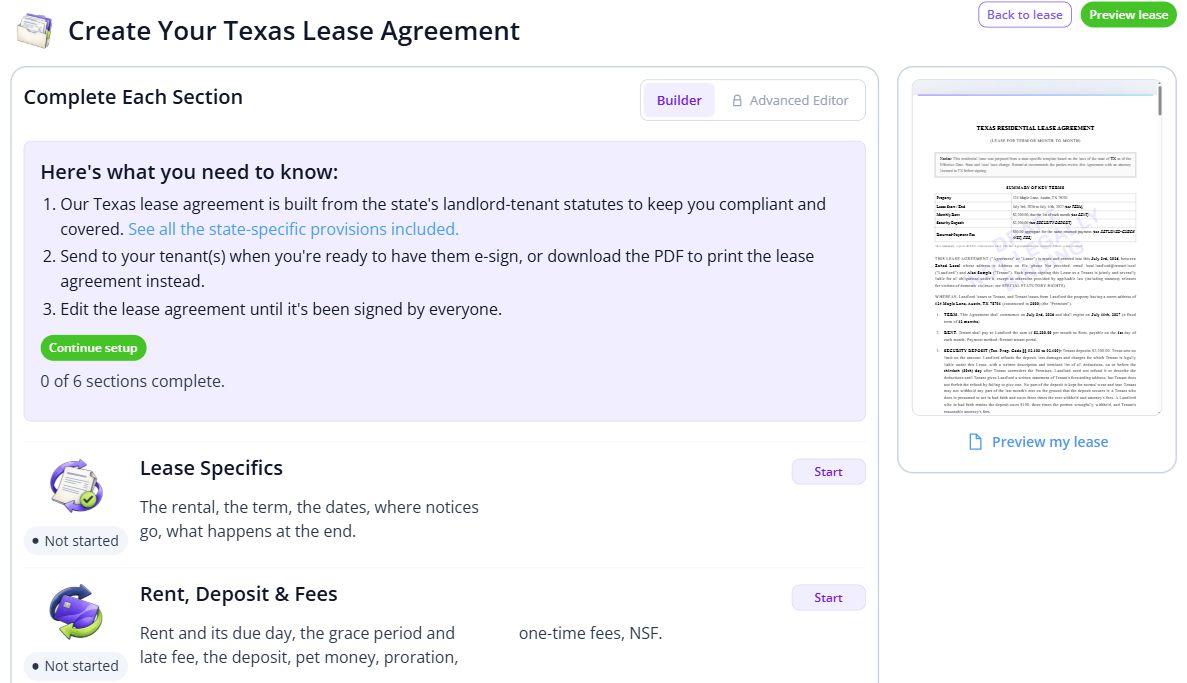
See the lease builder
Current lease builder with section progress, rental terms, charges and an agreement preview.
Prepare lease details section by section with an agreement preview alongside. Current screen.
Templates, disclosures and your own lease

Start with a template for your state and add the property and tenant details. Review the disclosures, deposit terms and notice periods, then include any pet, parking or utility riders that apply.

Already have a lease? Upload your document and use the signing workflow.

Explore lease templates
Reviewing flagged terms

The lease audit highlights potential issues and suggested changes. Review each flag and the cited source before you finalize the agreement.

You decide which terms to use and approve the draft before sending it.

See the lease audit
Signing, storage and renewals

Track each party's progress and retain the signed document and audit trail. Review renewal terms or addenda before sending another agreement for signature.

Start with 1 active lease.

The free plan allows 1 active lease and does not include sending for signature.

Signature sends included.

Prime costs $120 per year for up to 10 units. Paid plans include signature sends and support your ongoing leasing workflow.

Compare plans and all fees. Annual billing; larger portfolios have their own tiers.

Explore the workflow before you start.