Know the resident's rental record
Find the agreement and supporting tenancy files, and review access before sharing them.
Bring the rental work behind your community into one view. Keep tenancy documents, rent activity and repair follow-up connected, with local and funding-program requirements reviewed for your organization.
 THE PROPERTY AT THE CENTER
Find the agreement and supporting tenancy files, and review access before sharing them.
Check charges and payment activity before a rent conversation, including verified payments received elsewhere.
Keep the request and affected unit together as your team coordinates the work.
Watch the walkthrough from the beginning or pick the chapter you need. It includes product screens and illustrations.
Step 1 of 3
Find the resident’s agreement and supporting records. Review access before sharing documents with the household.
Check private and shared documents
Step 2 of 3
Check charges and payment activity on the lease before following up. Verify an outside payment before recording it.
Review rent activity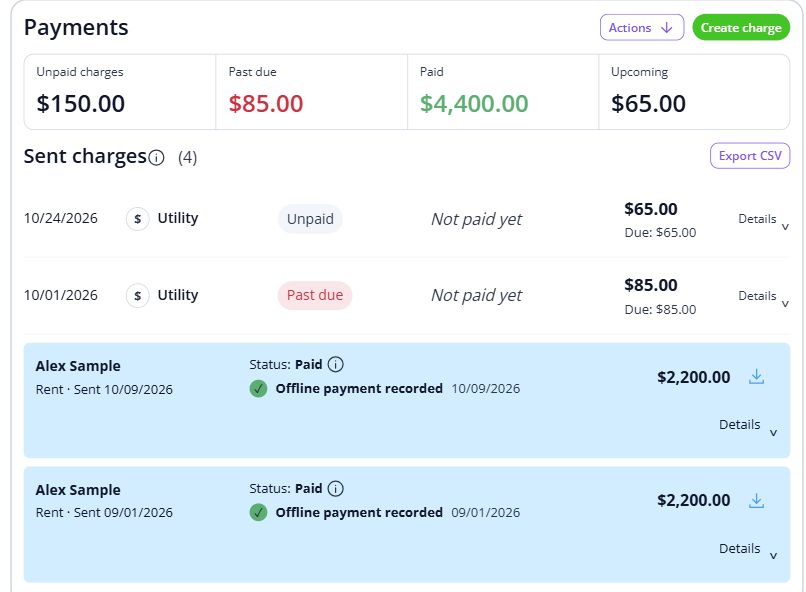
Step 3 of 3
Read the request, confirm the affected unit and review the next coordination step with your team.
Handle a maintenance request

Shared spaces and small conversations are part of what makes a place feel like home. Keep the records and everyday conversations connected, so the next person has the context they need.
For teams organizing the day-to-day rental operations of community-focused housing.
Explore the workspaceConfirm your location, funding-program requirements and reporting needs. Agree who reviews resident communications and urgent repairs.
Discuss your requirementsHave these details ready: resident and unit records; communication responsibilities; program-specific reporting needs.
 01
Add the property and units, then check their details before bringing in residents.
Property setup guide 02
Review the agreements, opening records and payment readiness for the first tenancy.
Review lease setup 03
Invite residents once the records are ready, and show them how to find rent, documents and repairs.
Tenant invitation guideOpen a step-by-step article with product guidance.
Use these examples to evaluate the rental workflow. Bring your required program reports and geographic requirements to a fit review before changing the systems your organization relies on.
Gather resident and unit records, communication responsibilities, program-specific reporting needs. Start with one property, check the records, and then bring in the rest of your portfolio.
No. It uses product screens with sample data. Open the linked Help guides for the steps to follow in your own account.
Review the current pricing page for unit limits, included tools and any payment or screening fees. Check that the plan covers the tasks you do most often.
See plans and feesCompare plans for the properties you manage.